How to Leave a Restart Cue for Interrupted Work
A restart cue for interrupted work records the next action, open question, and exact stopping point, making it easier to resume without rebuilding your plan.
You return to a draft after answering the door and find the cursor blinking beneath a half-finished sentence. A restart cue for interrupted work can save you from reconstructing what you meant, what you checked, and what comes next.
A useful cue is a small handoff to your future self, not a second copy of the project. It preserves just enough context to make the next move visible.
What was I trying to do?
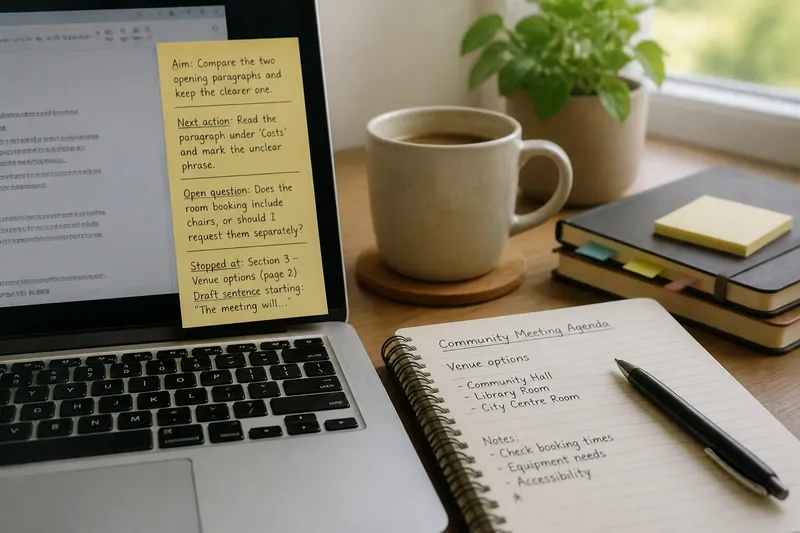
Write the immediate aim in plain language. “Work on the report” is too broad to guide a return; “compare the two opening paragraphs and keep the clearer one” gives the task a shape.
An interruption may leave the larger purpose intact while blurring the local one. Naming the immediate aim narrows the possible next actions without requiring you to restate the entire project.
Keep the cue short enough to understand at a glance. “Choose the stronger opening; preserve the example” is more useful than a polished project description that takes longer to read.
What action can I start right away?
Record an action that does not require planning the whole task again. “Review the document” still leaves you wondering where to begin; “read the paragraph under ‘Costs’ and mark the unclear phrase” points to a visible move.
Use a verb that names something observable: open, compare, draft, check, sort, or reply. Include the tool or location if it matters, such as “open the notes in the project folder and copy the two questions into the draft.”
Say you are preparing a community meeting agenda and pause to answer a call. You leave, “Add the library room option to the venue section.” On returning, you can go straight to that section; “finish agenda” would leave you to reconstruct the plan.
Which question or detail is still unresolved?
Record an open question in a form that preserves what you already know: “Does the room booking include chairs, or should I request them separately?” This keeps uncertainty visible without implying that it has been settled.
Distinguish a question you can check from a general worry. “Check whether the room includes chairs” gives you a task; “I might have missed something” does not. If you have ruled out an option or found a useful detail, note that too.
Some tasks have no pending decision. In that case, write “No decision pending” or leave the line blank. The point is to preserve useful information, not to fill every part of a form.
Where did I stop, and what context matters?
Mark the location that would otherwise take time to find. In a document, name a heading, comment, or the first words of an unfinished sentence; in a spreadsheet, specify the sheet and item; in a paper book, use a marker and note the relevant paragraph or topic.
“In the spreadsheet” may still mean searching several tabs. “On the ‘Supplies’ sheet, the chair line is blank” narrows the search and reminds you why you stopped there.
Think of the note as a bookmark with a reason attached. The bookmark returns you to the page; the reason helps you recover the thought.
Capture only context that would be awkward to reconstruct: a choice you made, a source you were comparing, or why a section is arranged as it is. “Keep the shorter version because the audience already knows the background” carries more useful context than “shorten this.”
Choose a place for the cue that you will see when reopening the task: the top of the working document, a sticky note beside a notebook, or a task app you already use. A separate system that needs its own upkeep can make the handoff harder to find.
What questions do people ask about restart cues?
How long should a restart cue be?
Include the aim, the next action, and any essential context, but keep the note quick to scan. If writing it takes longer than understanding it, remove background already easy to find in the work.
Should I write a cue after every interruption?
Use one when returning would require meaningful recall or when you expect a gap before resuming. For a brief pause in a simple task, a note may add more friction than clarity.
What if I do not know the next action?
Write the smallest question that would reveal it, such as “Which section is missing a source?” That question becomes the first task when you return, rather than leaving you with a vague instruction to continue.
Where should I keep the cue?
Put it beside the material it refers to or in a task list you already consult. A cue hidden in another notebook or app is less useful if locating it becomes another search.
When should I update the cue?
A restart cue is a handoff, not a promise to follow an old plan. If the task has changed by the time you return, revise the aim and next action before proceeding; the earlier note still helped you see where your thinking paused.
A restart cue for interrupted work cannot remove the effort of resuming, but it can remove avoidable guesswork. Leave the next action, unresolved detail, and stopping point close to the work, so your attention has a clear place to land.